Unlimited trips,
logged for free.
Drive off and the trip is there. At the end of the year a report comes out that holds up in an audit, and every kilometre you recover with it is money you keep tax free.
- Unlimited trips, no cap and no trial period
- Free, including the report for the tax office
- Official rates for 15 countries, your own rate anywhere else
No account, no subscription, no server. You can buy the ads away once.
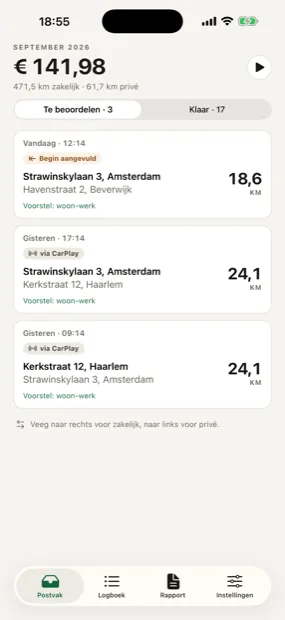
What are you leaving on the table?
People who track by hand forget trips. Every forgotten trip is money you could have kept tax free.
Calculated at € 0.25 per kilometre, the Dutch tax-free rate from 1 January 2026, over 46 working weeks. The other 14 countries have their own rates, some in miles or with a threshold; see below.
Per year, tax free
150 km per week · 6900 km per year
An indication, not a promise. What you may claim depends on your situation and on what you agreed with your client or employer.
Three things, that's all
The app does the measuring. You only do the part that needs a person: saying what a trip was for.
The trip starts on its own
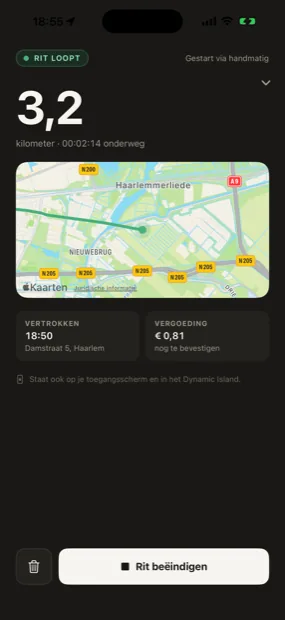
You don't switch anything on. Your phone notices you are driving, or you open the app on your car's screen. The trip keeps running in the background while your phone sits in your pocket.
You say what it was for
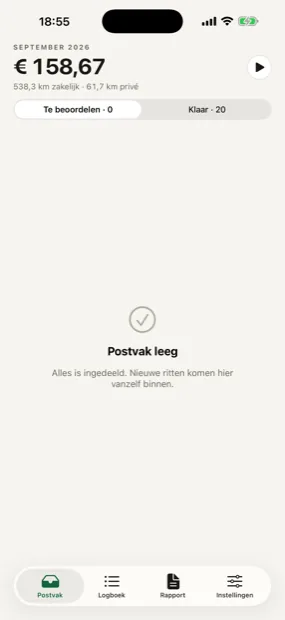
Afterwards the trip lands in your inbox. Swipe right for business, left for private. If the app already knows the address, or you drove during your working hours, it fills the category in and your inbox stays empty.
At the end you press report
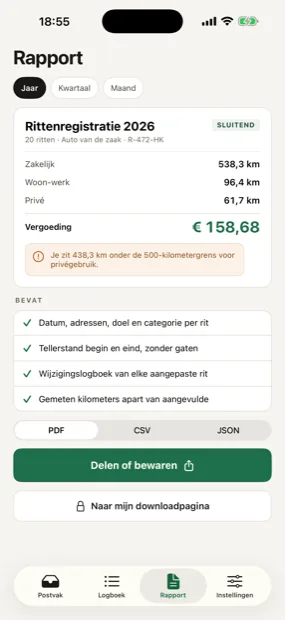
PDF for your accountant, CSV for your spreadsheet, JSON if you want to do something with it yourself. With totals per category, the amounts, and the change log underneath.
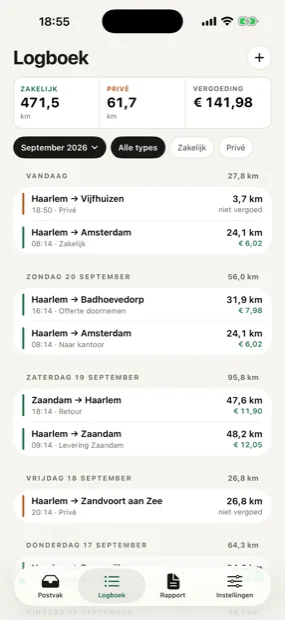
What's in the app
No trial period, no cap on trips, no feature that only unlocks when you pay.
Capture happens by itself
- Records trips automaticallyYour phone notices you are driving and records the route, with the screen locked and the app closed.
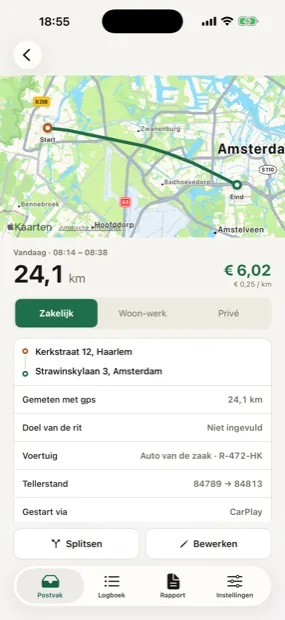
- Route on the mapEvery trip with the line you drove, the start and end address, and the times.
- On the lock screenA running trip sits in your Dynamic Island and on your lock screen, with a button to pause.
- Several carsA plate and its own odometer per car, and you pick which one your trips hang under.
Sort one swipe per trip
- Business, commute and privateThree categories, handled per country. Swipe right or left and the trip is sorted.
- Sorts itself by rulesA place rule for home and the office, plus your working hours. Anything inside those the app fills in.
- Split and edit tripsA trip that was really two, you cut in half. Addresses and purpose you adjust where needed.
- 15 countries, real ratesOfficial rates for 15 countries, in miles or local currency where that applies, with the older rates for earlier years. Anywhere else you set your own rate.
Account for it when someone asks
- Odometer and the 500 km lineStart and end reading per trip, one continuous series, and a warning as you approach 500 private kilometres.
- Change logEvery later edit is recorded with the old and the new value. Germany requires it, and it helps everywhere.
- Report as PDF, CSV or JSONFor your accountant, your spreadsheet, or to take with you. With totals per category and the amounts.
- All on your own deviceNo account, no server, no sync. Your route only leaves when you share a report yourself.
Why this can be free
Most mileage apps charge per month and cap the number of trips in their free tier. This one does not: there is an ad banner at the bottom, and that is it.
| This app | A subscription elsewhere | |
|---|---|---|
| Trips per month | Unlimited | Often capped in the free tier |
| Cost | € 0 | Usually a monthly or yearly fee |
| Report for the tax office | Included | Often paid tier only |
| Account needed | No | Usually yes, with a password |
| Where your trips live | On your own device | On the provider's server |
| Ads | Yes, and removable once | No, you pay with money |
Fair is fair: an ad is a price too. That is why you can buy it away once, and why the ad module never sees your trips.
Four ways a trip begins
Turn on as many as you like. Whichever fires first starts the trip.
Motion
Your phone senses that you are in a car and turns on GPS once you are really moving. The app fills in the first stretch afterwards, shown separately in the report.
CarPlay
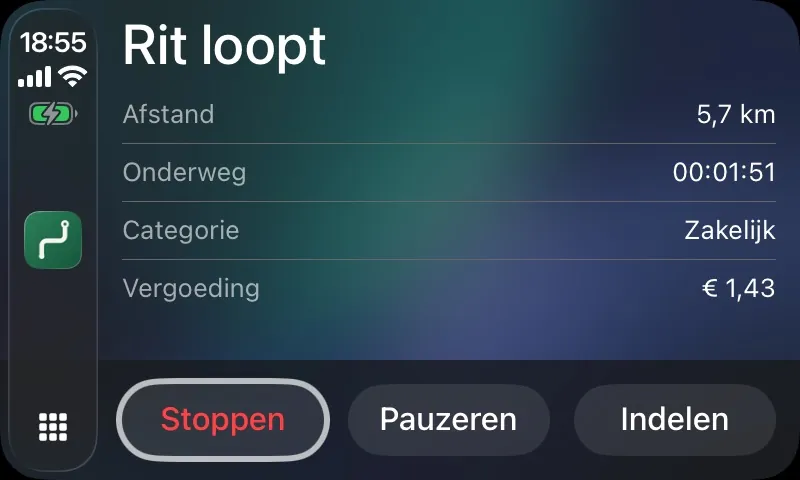
Open the app on your car's screen and the trip runs. Unplugging stops it again. On the way you see distance, time and amount, and you can sort the trip right there.
NFC sticker
A sticker on your dashboard. Hold your phone against it and the trip starts to the second. One action, but the sharpest start time you can get.
Beacon in the car
A beacon of five to fifteen euros in the cigarette lighter or the OBD port. This is the only signal that wakes the app from fully closed. Not shipped yet: the hardware is still in development.
On your car's screen too
Four lines, three buttons. Enough to know where you stand, little enough that you don't have to look.
- Distance, time and amount run along while you drive
- Pause for charging or refuelling, so a stop doesn't split your trip in two
- Sort the trip as business, commute or private on the spot
- When you stop, the car screen asks what the trip was for
CarPlay is still waiting on Apple's approval, so it is not in the App Store version yet.
A logbook that survives an audit
A mileage log is only worth something if it adds up. The app watches that itself and says so when something is missing.
- Date, start and end address, purpose and category on every trip
- Odometer reading at the start and the end, with no gaps in the series
- A change log of every edit you make later
- Measured kilometres stay separate from kilometres that were filled in
That change log is not a nicety. Germany requires it for an ordnungsgemäßes Fahrtenbuch, and in a Dutch audit it is your best defence.
How do you claim your kilometres?
The rules differ per country and per situation. Here is the short version, with the rates that apply right now.
There are roughly three situations. You drive your own car and claim the business kilometres. Then you may count a fixed amount per kilometre, tax free. You drive a company car. Then it is not about what you may claim but about what you must prove: that you don't use it privately too much. You are an employee with an allowance. Then your contract or collective agreement decides what you get, and the tax office only decides up to which amount that stays tax free.
In all three cases the evidence is the same: a mileage log that adds up. That is what this app is for.
| Country | Rate | For what |
|---|---|---|
| Netherlands | € 0.25 | Tax-free allowance from 1 January 2026 (€ 0.23 before). Business trips and commuting alike. |
| Belgium | € 0.4452 | Flat-rate allowance for professional travel, fourth quarter of 2026. Re-indexed every quarter. |
| Luxembourg | € 0.30 | Business trips. Commuting falls under the flat-rate travel deduction. |
| Germany | € 0.30 / € 0.38 | € 0.30 per kilometre driven on a business trip. € 0.38 per kilometre of the one-way distance for commuting, since 2026. |
| Austria | € 0.50 | Amtliches Kilometergeld since 2025 (€ 0.42 before), tax free up to 30,000 km a year. |
| France | Barème | Depends on the car's fiscal horsepower and your yearly total, so France is calculated per year, not per trip. |
| United Kingdom | 55p / 25p per mile | 55p for the first 10,000 business miles in the tax year, then 25p. From 6 April 2026 (45p before). |
| Denmark | 3.94 / 2.28 kr | 3.94 kr up to 20,000 business kilometres a year, then 2.28 kr (2026). |
| Sweden | 2.50 kr | 25 kr per mil (10 km), tax free. |
| Norway | 3.50 kr | Tax free. The state rate is 5.30 kr; whatever is paid above 3.50 kr is taxable. |
| Finland | € 0.55 | Kilometrikorvaus for 2026 (€ 0.59 in 2025). |
| United States | 76¢ per mile | IRS standard mileage rate from 1 July 2026 (72.5¢ from January to June 2026, 70¢ in 2025). |
| Canada | $0.73 / $0.67 | $0.73 for the first 5,000 business kilometres, then $0.67 (2026). 4¢ more in the territories. |
| Australia | 91¢ | Cents per kilometre for 2026-27 (88¢ before), up to 5,000 business kilometres per car a year. |
| New Zealand | $1.20 / $0.37 | Petrol car: tier 1 until the car has done 14,000 km in the year, private kilometres included, then tier 2. |
| Any other country | Your own rate | You enter a rate per kilometre in your local currency. Possible in the 15 countries above too, for example for what your employer pays. |
Netherlands
For 2026 the tax-free travel allowance is € 0.25 per kilometre, up from € 0.23 and backdated to 1 January. Anything above that counts as salary. The amount covers every means of transport and applies to business trips as well as commuting.
If you are self-employed and drive your own car, you book the business kilometres as costs: business kilometres × € 0.25. The actual running costs of the car then do not belong in your books, because they are already inside that amount.
If the car is owned by the business, it works the other way around: the real costs are deductible and you face an addition to your taxable income for private use. Drive fewer than 500 private kilometres a year and that addition falls away, but only if you can prove it with a log that adds up. That is exactly what an audit goes after. The app tracks that 500-kilometre line for you and warns you when you get close.
Don't forget VAT. For private use of a company car you make a VAT correction at the end of the year. With a proper kilometre administration you may base that correction on the real ratio instead of the flat rate, which usually saves money.
Putting it in your books
The report from the app is your evidence, not your entry. The entry itself is short:
- Own car, self-employed. One journal entry per period: business kilometres × the rate, to travel expenses, against your capital account (capital introduced, since the business used your car). Attach the report to that entry.
- Company car. Book the car costs as they come in. At the end of the year the addition for private use follows, unless the report shows you stayed under 500 private kilometres.
- Employee. Hand the report to your employer. They pay up to the tax-free rate; anything above it runs through payroll.
- Billing kilometres to a client? Then it is simply revenue, with VAT, and it stands apart from the tax-free allowance. The report is your specification with the invoice.
Keep the report as long as your local law requires, seven years in the Netherlands. The app stores nothing on a server, so the report you export is your archive. Make one at least once a year.
What a log that adds up must contain
Per trip you need:
- the date
- the odometer reading at the start and at the end
- the departure and arrival address
- the route driven, if it differs from the usual one
- whether the trip was business or private, and for business the purpose
The word that matters is continuous. The odometer readings must join up: the end of one trip is the start of the next. One gap and the whole administration can be rejected, even if everything else is right. The app recalculates that series itself and puts not complete at the top as soon as something is missing.
Belgium, Germany, France and the rest
Belgium uses a flat-rate mileage allowance that is re-indexed every quarter. For the fourth quarter of 2026 it is € 0.4452 per kilometre. A parallel system exists that changes only once a year, on 1 July. The app calculates with the quarterly amounts and keeps the older ones, so a report about an earlier period uses the rate that applied then.
Germany draws a sharp distinction that is easy to miss. For a Dienstreise in your own car you count € 0.30 per kilometre actually driven, so there and back. For commuting the Entfernungspauschale applies: since 2026 € 0.38 per kilometre, but only the one-way distance, however often you drive it. The app records your real kilometres; for the Entfernungspauschale you take the one-way distance from them.
Germany also has the strictest demands on the logbook itself. An ordnungsgemäßes Fahrtenbuch must be continuous, not editable after the fact, and every correction must stay visible. That is why this app never lets you change a trip quietly: every edit goes into a log that only ever grows.
France uses the barème kilométrique. That is not a fixed amount per kilometre but a scale that depends on your car's fiscal horsepower (the chevaux fiscaux) and on how many kilometres you drive in the year. A trip can therefore only be valued afterwards, once the year is done. So the app shows no amount per trip in France and works out the total per year.
The other countries each have their own twist: a threshold after which the rate drops in the United Kingdom, Denmark, Canada and New Zealand, a cap in Austria and Australia, and their own tax year in the United Kingdom, Australia and New Zealand. The app applies all of that per tax year, and splits a trip that crosses a threshold over both rates. Each country is explained on the page per country.
Please note
This is general information, not tax advice. The rates above were checked on 23 September 2026, but rates change and your situation may differ. If in doubt, ask your accountant or check the site of your tax authority: the Belastingdienst, HMRC, the IRS, the CRA, the ATO or whichever applies to you. They are listed on the page per country.
Your trips stay yours
Where you drive and when is sensitive. So there is no server to send it to.
- Everything sits in a database on your phone, and nowhere else
- No account, no sign-in, no email address
- Your route leaves your device only when you share a report yourself
- Ads live on the other side of the wall and never see your trips
How that works exactly is in the privacy policy.
Questions that come up
What does it cost?
Nothing. The app is free and there is no subscription. There is an ad banner at the bottom. If you want it gone you can buy it away once. Every feature works without doing that.
Which countries does it work in?
Fifteen countries have their official rates built in: the Netherlands, Belgium, Luxembourg, Germany, Austria, France, the United Kingdom, Denmark, Sweden, Norway, Finland, the United States, Canada, Australia and New Zealand. Anywhere else you enter your own rate per kilometre, in your local currency.
The app picks your country itself when you set it up, from your location or otherwise from your iPhone's region, and it never changes per trip: driving across a border does not change the country you are taxed in. Distances are in miles and amounts in pounds or dollars in the UK and the US, in the local currency elsewhere. The app itself is available in English, Dutch, German, French, Danish, Swedish, Norwegian, Finnish, Italian and Polish. The rules per country.
Can I use my own rate instead of the official one?
Yes, in every country, the Netherlands included. Switch on Custom rate and enter what your employer or client actually pays per kilometre. The report then says explicitly that it uses your own rate, so nobody mistakes it for the official one.
Will it drain my battery?
No. At rest the app does almost nothing: iOS only nudges it when your phone really changes location. Only when that looks like driving does GPS come on, and it goes off again once you stop.
Does it work with my phone locked in my pocket?
Yes, but it needs the Always location permission. With While Using a trip only continues while the app is open.
What if the app is killed mid-trip?
Every measured point goes straight to disk. A crash or a restart costs you one point at most. Reopen within two minutes and it picks the trip back up; longer than that and it closes the trip and marks it as less reliable, so you can see it.
Can I still edit a trip?
Yes, and you should be able to: a wrongly sorted trip has to be fixable. Every edit does go into the change log, with the old and the new value, and that log goes into the report. That is not distrust, it is what an audit of a logbook expects.
I drive two cars. Is that a problem?
No. You add a vehicle per car, with its plate and odometer readings, and pick which one your trips hang under. You can switch that on the CarPlay screen too, before you drive off.
Can I take my data with me?
Yes. Besides PDF and CSV the app exports JSON, with everything in it: trips, points, vehicles and the change log. There is no lock on it.
Everything about claiming kilometres
What you may count, what you must keep and how to book it. Explained per country, with the rates that apply now.
Mileage rates across Europe: 11 countries compared
What you may count per kilometre (or mile) in each European country the app knows, and the differences that catch people out when they drive across a border.
What a compliant mileage log has to contain
The fields tax authorities ask for, from the Netherlands to New Zealand, and the one property that matters more than any single field.
Company car or your own car: which works out better?
The trade-off is the same in every country, even though the names differ. Two numbers decide it: the price of the car and how much of your driving is private.
Put it on and drive
The first trip you find waiting in your inbox is the moment you understand why this can be free.
For iPhone, iOS 17 and up.